
Bookmark files
Add files by URL, bookmark the current file, or paste multiple links in one go. Pro: import all files from a team (team link and Personal access token required). Each entry stores the link plus name, folder, tags, and metadata.
Figzer is a Figma plugin that lets you bookmark, organize, and sync access to your Figma files. No more hunting through teams and projects—keep a single library of file links in folders, with tags and metadata.
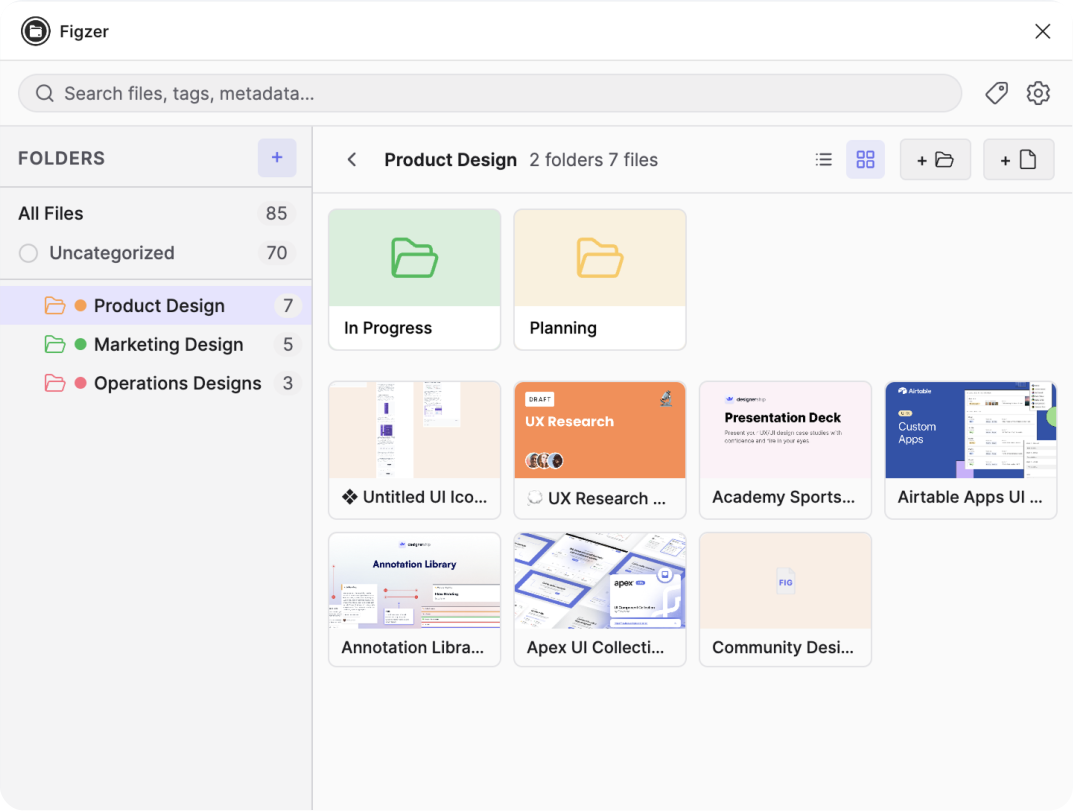
Folders, search, and file list in one panel. Free to start, no account required.
Add files by URL, bookmark the current file, or paste multiple links in one go. Pro: import all files from a team (team link and Personal access token required). Each entry stores the link plus name, folder, tags, and metadata.
Free: up to 3 main folders, 3 sub-folders, 25 files, one level of nesting. Pro: unlimited folders, sub-folders, and nesting. Use Uncategorized for loose files, folder colors, and pin important items to the top.
Search by name or tag, switch between list and grid view. File thumbnails when you connect a Figma account. Click a file to open it in Figma in the browser.
Sync your library to the cloud and use it on every device. Cloud backup, auto-sync after local changes, and the same folders and links everywhere.
Export a JSON backup of all your data or import from a backup to restore or migrate. Your library, your control.
The free plan needs no account. Up to 3 folders, 25 files, search, tags, and metadata—all stored locally in Figma. Connect a Figma account for file thumbnails.
Start free with no sign-up—3 folders, 25 files, all locally. Upgrade to Pro for unlimited structure, cloud sync, team import, and backup.